
Introduction
Incoming Solar
Activity II Istructions: video explanation
Earth and its Axis
Activity III Instructions: video explanation.
Solar Energy
Activity IV Instructions: video explanation.
Annual Temperatures
Activity V Instructions: video explanation
find your latitude and longitude
 |
The Reasons for the Seasons:
|
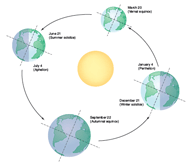
Solar EnergyThe amount of solar energy reaching Earth at any particular latitude is defined by how the Earth orbits the Sun. As the Earth orbits the Sun, its axis of rotation is tilted at an angle of 23.5° from its orbital plane, as seen in the animation below. This tilt is referred to as the angle of inclination. Because Earth's axis of spin always points in the same direction-toward the North Star-the orientation of Earth's axis to the Sun is always changing as the Earth orbits around the Sun. As this orientation changes throughout the year, so does the distribution of sunlight on Earth's surface at any given latitude. This links the amount of solar energy reaching a location to the time of year and causes some months of the year to always be warmer than others-in other words, the seasons.
Set the date to March 21 (or very close to that day), you'll know you are close to March 21 if every latitude has 12 hours of daylight, as indicated by the blue curve on the right that represents the total number of daylight hours at a given latitude. From the 'top view' perspective, notice how the day/night line, known as the terminator, passes through the North Pole. Now, click on the 'Solar Insolation' button to the right. A purple line will appear on the curve above that is the average amount of solar energy (in Watts per square meter) shining on a given latitude. The values are along the x-axis. Can you correctly answer the question below?
Now, using the triangle, move the earth to the summer solstice, June 21. Notice the sun never rises at the South Pole so the incoming solar energy is zero. On this day, the sun never sets below the horizon above the Arctic Circle, but (except at the North Pole) the sun is higher in the sky at noon than during the early morning. You can see this by revisiting Activity I under Incoming Solar: Set the time to June 21 and the latitudes at two location north of 66N.
|
|